3 Ways to Make your Website Neurodivergent-Friendly & Google-Friendly
A Google-friendly website is easily discoverable on search engines. A neurodivergent-friendly website is built for a range of processing styles. Here’s my observation: the features that make a website neurodivergent-friendly also make it Google-friendly. Win-win.
Introduction
I’m Liz Zhou, a web designer, copywriter, and therapist. I build beautiful, thoughtful websites for therapists & coaches, so they can connect with their ideal clients, show up authentically online, and share their unique gifts with the world.

What is a “Google-friendly” website?
A Google-friendly website is easily discoverable on Google and other search engines like Bing, Yahoo, and ChatGPT. If your website is Google-friendly, it’s more likely to show up on or near page 1 when people search for your services (ex: therapy in San Francisco, California or psychedelic therapy retreats in Colorado).
A Google-friendly website is good for business – because if your clients can find you online, your marketing becomes a lot easier.
Another term for Google-friendly is “SEO-optimized,” or “having good SEO.” SEO stands for Search Engine Optimization.
>> To see a Google-friendly website in action, check out Liz’s portfolio.
>> To learn more about SEO, check out this blog post: How to Get Found by Clients on Google — Let’s Demystify SEO
What is a “neurodivergent-friendly” website?
A neurodivergent-friendly website uses intentional design & copywriting to accommodate a range of processing styles.
🖼️ Some brains process best through images.
🔤 Some brains prefer to read words.
🐇 Some brain skim websites quickly, scrolling from one page to the next.
🐢 Some brains focus on details, slowly reading every single section.
🌀 Some brains need thorough & repetitive information in order to build trust & make a decision.
⚡ Some brains jump quickly to a decision.
…and so on.
As a disclaimer: a neurodivergent-friendly website isn't necessarily going to feel perfect for every single person, since there is a vast range of brains, processing styles, and neurotypes in the world.
A neurodivergent-friendly website aims to be as inclusive as possible, with openness to changes & updates across time to continually expand its scope of accessibility.
>> To learn more, check out this blog post: What is a Neurodivergent-Friendly Website, Exactly?
Here’s my observation (as a neurodivergent therapist & website strategist):
The features that make a website neurodivergent-friendly also make it Google-friendly (AKA, more discoverable in search results).
Neurodivergent-friendly websites present information in a clear & logical way, allowing Google to understand exactly which users to send their way.
Let’s break it down.
WEBSITE TIP #1:
Use clear H1 headings on each page of your website.
🔍 THE GOOGLE SIDE
On Squarespace (& other website platforms), you can adjust the font size for any text on the page.
The biggest font size is Heading 1 (H1). In the eyes of Google, H1 headings are the most important text on the page. The info contained in H1 font is weighed with most importance when Google’s bots “scan” your page and decide where to position it in search results.
After H1, the next most important is H2, then H3, H4, then Paragraph 1, P2, P3.
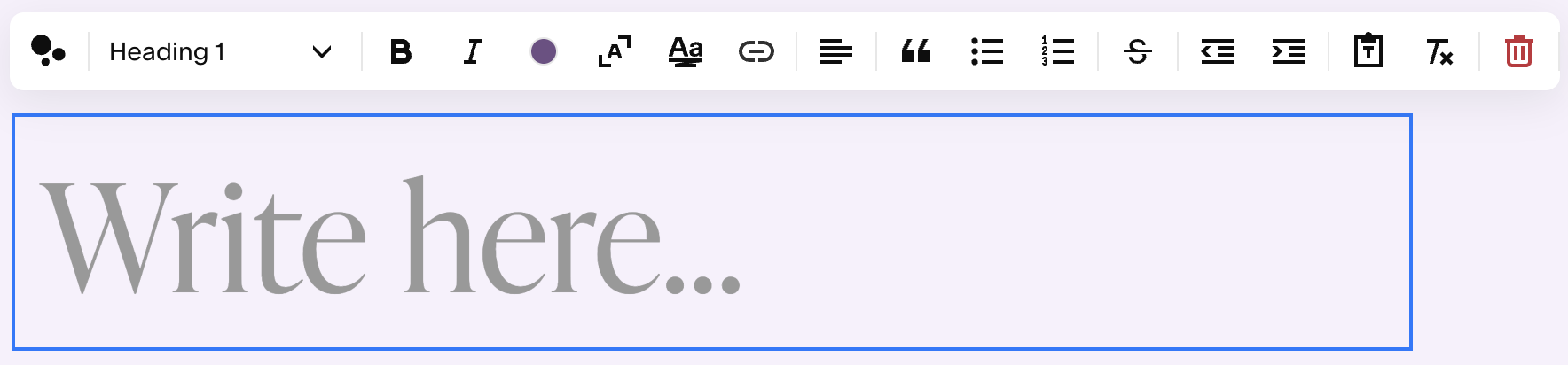
Here’s what Heading 1 (H1) text looks like on the back end of Squarespace, my website platform of choice as a designer.
H1 is the most valuable “real estate” on your website – so use H1 headings wisely, clearly, and concisely, and only once per page.
(If you make everything H1, then it dilutes the significance of this font size, and confuses Google.)
So, if your practice specializes in family counseling, you might write: “Family Counseling in CITY, STATE” in H1 at the top of your home page.
I wouldn’t advise using H1 heading to say something like, “My name is Liz” – because while that is important to know, it’s not the most important thing I want Google to know.
🧠 THE NEURODIVERGENT SIDE
Clear headings make your website easy to digest & process, saving processing energy for all brains.
When the message of your website is clear & easy to find, visitors are less likely to become confused, disoriented, or frustrated. They’re more likely to stay & enjoy their “visit” to your digital space.
This is so important! It’s one step closer to making the Internet a more navigable & less overwhelming place.
WEBSITE TIP #2
Create thoughtful FAQ (Frequently Asked Questions) sections.
I recommend having a stand-alone FAQs page on your website.
If you have additional service pages on your website (ex: EMDR, DBT, and Family Counseling), I also recommend including a brief FAQ section on each service page.
For instance, at the bottom of your EMDR Therapy Service Page, you might include a section that looks like this:
FAQs about EMDR Therapy in (CITY, STATE)
How does EMDR therapy work?
Does EMDR work online & in person?
How many EMDR sessions will I need?
How do I book my first session?
In each FAQs section, list questions that your ideal clients would likely type into Google.
Don’t worry, you don’t have to be tech-savvy to figure out this information. Simply notice what queries auto-fill in the Google search engine bar when you start typing the name of your service.
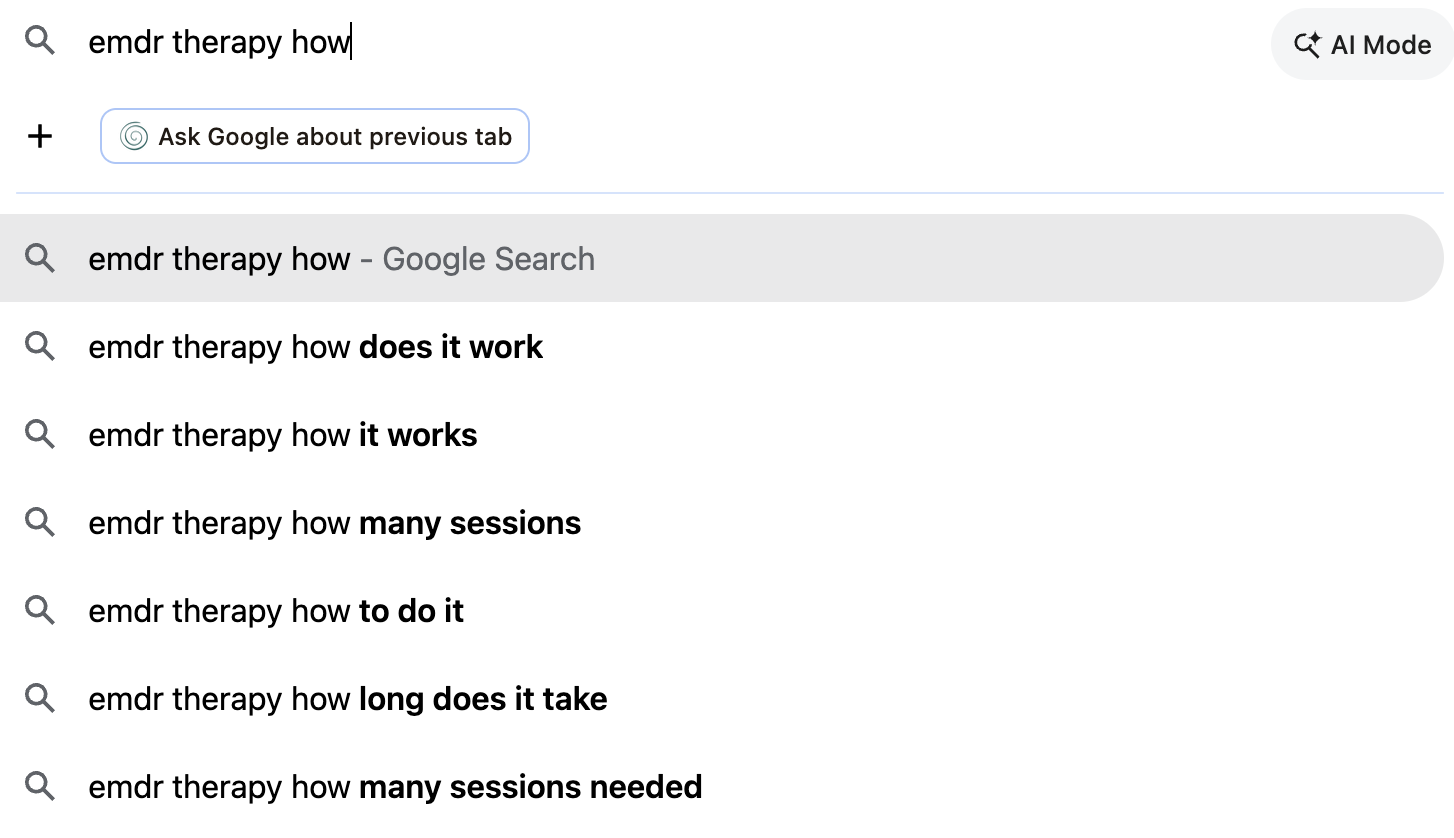
Here’s an example of queries that auto-fill when I type in “emdr therapy” in Google.
Try this for a key word related to your business (ex: couples therapy, ADHD coaching, IFS consultation), and see what comes up.
If you want to take your research to the next level, you can use a keyword research tool like UberSuggest. (Or, hire me as your SEO specialist! 👋🏽)
🔍 THE GOOGLE SIDE
When you address commonly-Googled-questions in the FAQ sections of your website, you improve the SEO of your website.
Why is this? Because you’re showing Google that you’re a source of valuable & helpful information – which gives Google a reason to show your website higher in search results.
🧠 THE NEURODIVERGENT SIDE
By putting the FAQ section at the end of the service page — the final place that people will scroll — you give readers a chance to see all the important information in one compact section.
This is helpful for skimmers, who may not have thoroughly read every single word, but might want to reference the FAQs section for key points.
WEBSITE TIP #3
Choose images intentionally, and write alt text for all images.
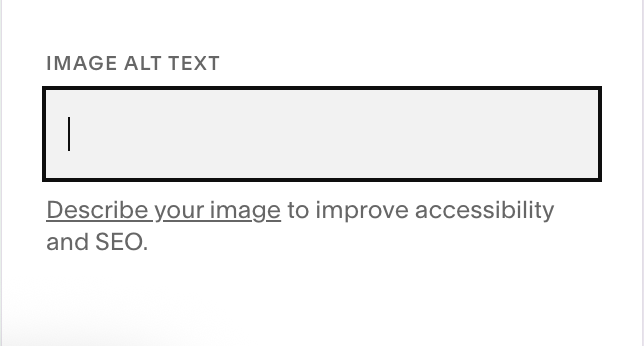
Alt text describes what images look like to website visitors who aren’t able to see the images & who are using screen readers. This makes website content more accessible to people with visual impairments.
🔍 THE GOOGLE SIDE
When writing alt text for images, be as accurate & clear as possible. If possible, try to include SEO keywords in a way that makes sense and actually describes the image.
For example, if you include an image of a therapy office, for the alt text, you might write:
"colorful room with soft lighting, blue couches, & green plants; therapist's office in Dallas, Texas."
(The SEO keyword here is: “therapist in Dallas, Texas.” Replace with your city & state for your own website.)
This accurately describes what the image is, and also sends a little signal to Google that you're a therapist in Dallas, Texas. Across time, these little signals add up, increasing your website’s chances of showing up when people turn to Google to look for a therapist in Dallas.
🧠 THE NEURODIVERGENT SIDE
Images play a huge role in a website visitor’s initial impression of your website. Our brains process images faster than text – so when someone clicks onto your website, before their brains can process the meaning of the words, they’re already feeling & sensing something in response to the images.
According to a study by the National Library of Medicine: “The human brain processes images 60,000 times faster than text, and 90 percent of information transmitted to the brain is visual.”
Images have the power to evoke a range of feelings: calm, hopeful, peaceful, grounded, confident, and more.
Ask yourself how you want your future clients to feel when they land on your website — and choose your images accordingly.
When you’re marketing a service as personalized & relational as therapy or coaching, your website should evoke the energy of what clients may experience if they work with you.
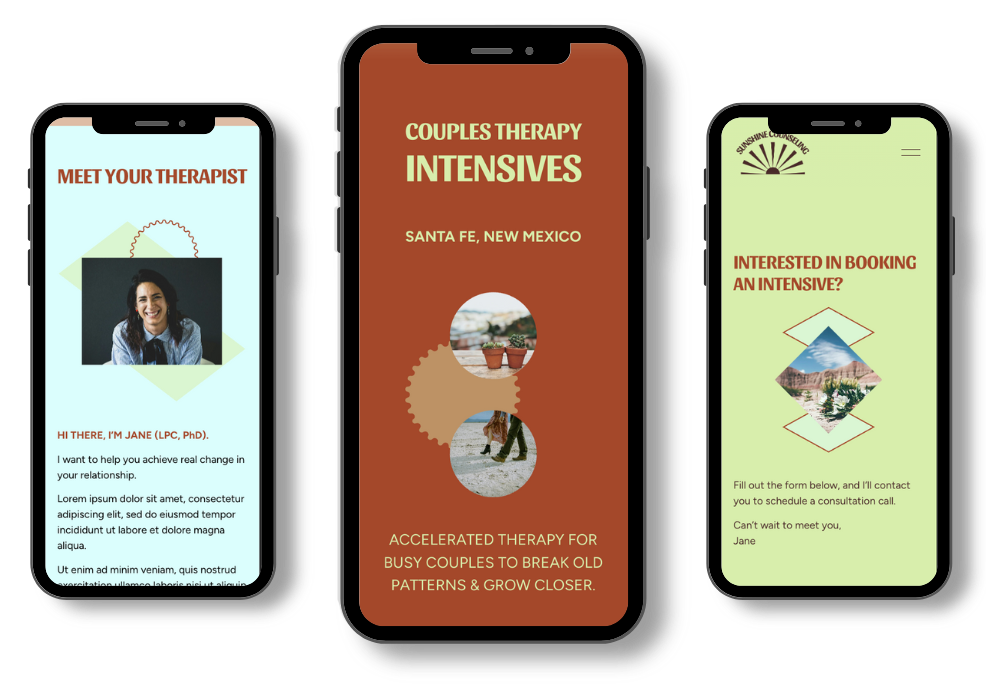
>> To see a neurodivergent-friendly website template in action, check out my portfolio.
SUMMARY
Use clear H1 headings on each page of your website.
Create thoughtful FAQ (Frequently Asked Questions) sections.
Choose images intentionally, and write alt text for all images.

Want to learn more about neurodivergent-friendly websites?
Join Delightful Sites, a weekly email series helping therapists, coaches, and entrepreneurs build sustainable, values-aligned businesses, through the power of website marketing.
👉🏽 Subscribe to receive Liz’s newsletters directly in your inbox.
Need an expert perspective on your DIY website project?
👉🏽 Book a website audit with Liz.
I’ll provide personalized feedback on your site, and you’ll leave with 3+ actionable steps to improve your design, copywriting, and SEO.
Ready for a neurodivergent-friendly website that attracts your ideal clients with ease?
Explore website packages (done-for-you web design, copywriting, and SEO services) — so you can have a website that saves you time & energy, markets for you 24/7, and makes you feel great about your online presence.
👉🏽 Book an intro call for a website package with Liz.